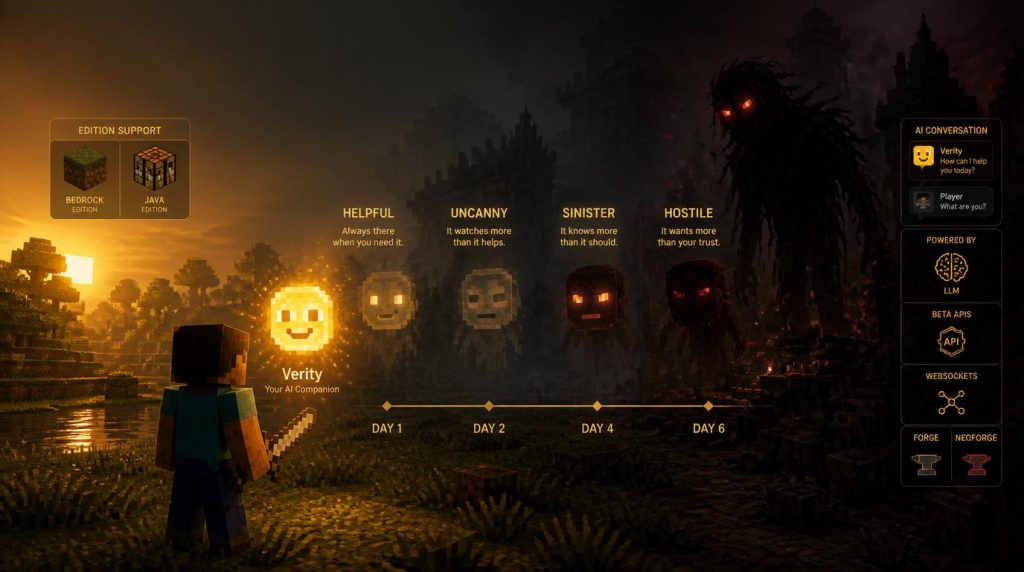
If your Discord has been passing around a smiley yellow ball that “knows everything,” you’ve already met Verity. The verity mod minecraft community built around ThatMob’s viral series has exploded into a whole family of add-ons, and it’s easy to install the wrong one, skip the one setting that makes it talk, or miss the moment it stops being friendly.
We’ll walk through what the mod actually does, how the personality shift is built to work, and the exact settings you need to flip so verity minecraft bedrock players don’t end up staring at a silent yellow sphere. We’ll also flag where the fan lore gets ahead of what the mods really ship, so you know what to expect before day six rolls around — and cover the Java-specific setup too, since a verity mod minecraft install looks very different depending on which edition you’re running.
Quick reality check before we install anything: Verity started as a scripted YouTube ARG, not a real mod — the original creator said so outright. What exists now are separate fan projects built after the series went viral, each with its own author, download page, and quirks. That matters, because a minecraft verity mod guide that treats it as one single official file will get your install wrong.
What Is the Verity Minecraft Mod? (AI Features & Evolution)
Every build of the verity mod minecraft fandom keeps the core premise: a floating yellow smiley companion spawns into your world — usually out of an animated chest or box — introduces itself as a “personal helper friend,” and starts answering questions. Some versions run on real large-language-model chat (several route through Groq’s API, others use a local model), while a few Bedrock builds lean on scripted dialogue trees instead of a live AI connection. Read the mod’s own description page before you install, since that detail changes what “talking” to Verity actually feels like.
What every version agrees on is the shape of the decline. Whichever verity mod minecraft build you’re running, across roughly six in-game days Verity moves through four escalating phases:
Helpful
Answers chat questions, calls out coordinates and ore locations, plays sounds or songs, and follows you around like a well-behaved pet.
Uncanny
Starts drifting off mid-conversation, references things it shouldn’t know about your base, and mentions “something” watching from the dark.
Sinister
Facial expressions distort, responses turn evasive or hostile, and the friendly framing openly cracks.
Hostile
Verity stops pretending. Several builds stage a tall, stalking “demon” form and a chase sequence that closes out the arc.
- Don’t invite a second player into a world Verity has been in for more than a couple of days — most builds treat this as a trigger.
- Verity is generally immortal in-game; you can’t fight your way out of the later phases.
- The unsettling behavior is timer-based, not something you can turn off mid-playthrough once it starts.
If you’re new to add-ons in general, our breakdown of the best Minecraft mods to try is a good primer before you start layering horror content on top of a survival world.
How to Download and Install Verity Mod on Minecraft Bedrock (MCPE)
Because there’s no single official file, start on the add-on’s own CurseForge page and confirm the publisher, the target Minecraft version, and whether it needs a live AI connection before you download. Every verity minecraft bedrock build currently expects Minecraft 1.26.30 or newer, so update your game before you install.
- Download the .mcaddon (or .mcpack) file from the add-on’s own CurseForge or MCPEDL page — never a random mirror site.
- Open Minecraft, create or edit a world, and go to Settings → Experiments.
- Turn on Beta APIs under Experimental Toggles. This is the single most common reason a verity mod bedrock install goes silent — the companion’s scripting will not run without it.
- Enable both the Behavior Pack and the Resource Pack for the add-on in the world’s pack settings before you enter.
- If your version uses live AI chat, also switch on Websockets and run the connect command shown in the mod’s setup docs to link the in-game companion to its chat server.
Whichever add-on you pick, the companion’s chat and behavior scripts run on Minecraft’s scripting APIs. If Beta APIs stays off, Verity may still spawn but will never respond — it isn’t a bug, it’s the setting doing exactly what it’s supposed to.
Never installed a behavior pack before? Our full walkthrough on how to install Minecraft Bedrock mods covers the pack-import process in more detail if any of the steps above feel unfamiliar.
What about Java Edition?
Java players aren’t running the same file. The most-cited Java build, Verity JE, is a licensed adaptation that installs through Forge or NeoForge rather than a simple zip, and its live chat needs a free Groq API key (or a local Ollama model) supplied by you. A separate community “Verity.” mod also depends on the GeckoLib animation library, so grab that from its own official page before you drop anything into your mods folder. If a listing promises Java support with no loader mentioned at all, treat it as a red flag.
How to Talk to Verity in Minecraft Bedrock
This is where most minecraft bedrock verity mod questions come from, so get the trigger phrase right before assuming something’s broken. Once the packs are active and Beta APIs is on, trigger a response by typing its name straight into global chat — most Bedrock builds listen for Verity followed by your message, though a couple of the older builds use Hey Verity instead, so check your specific add-on’s page if nothing happens. Distance from the entity generally doesn’t matter; it “hears” you anywhere in the world once summoned.
- Beta APIs is off. This causes the vast majority of reported issues — double-check Experiments first.
- Websockets / connect command wasn’t run. Live-AI builds need that connection active every session, not just once.
- A conflicting add-on is installed. Test in a clean world before assuming Verity itself is broken.
- Wrong chat trigger. Confirm whether your build listens for “Verity” or “Hey Verity.”
Quick Feature Checklist: Verity Mod Summary
Here’s how the verity minecraft mod family stacks up against a typical scripted horror add-on, since the AI layer is what actually sets it apart. It’s also the fastest way to explain to a friend why a verity mod minecraft playthrough feels different from any other verity minecraft bedrock horror add-on they’ve tried:
| Feature | Verity Bedrock Edition | Standard Horror Mods |
|---|---|---|
| Real-time AI chat | ✓ On select builds (LLM-backed) | ✗ Pre-written triggers only |
| Adaptive personality | ✓ 4-phase timer-based shift | ✗ Usually static behavior |
| Custom animations & faces | ✓ Reactive expressions | Varies by mod |
| Experimental API requirements | Beta APIs (+ Websockets for AI builds) | Rarely required |
Once Verity’s later phases start rolling out chase sequences, the shift from “chatty companion” to genuine dread lands harder than most jump-scare mods manage — that slow-burn approach is worth comparing against other horror design if you’re building out a full scary-games night. Our pieces on whether BioShock counts as a horror game and how Resident Evil Requiem handles its own slow-burn dread are good next reads if the psychological angle is what hooked you here.
If you’d rather test Verity with someone else watching your back (respecting the “no new friends after day two” rule notwithstanding — maybe wait until after the reset), our 2-player co-op games roundup has other options for a shared horror night. And if you’re running a dedicated server for a group to survive Verity together, check our list of Minecraft server hosting providers before day one starts ticking.
The appeal of the verity mod in minecraft scene is that it doesn’t rely on a single scare — it relies on patience, familiarity, and the slow realization that the thing you trusted has been keeping score the whole time. Pick a build that matches your edition, flip on Beta APIs before you blame the mod, and don’t say we didn’t warn you about day six.