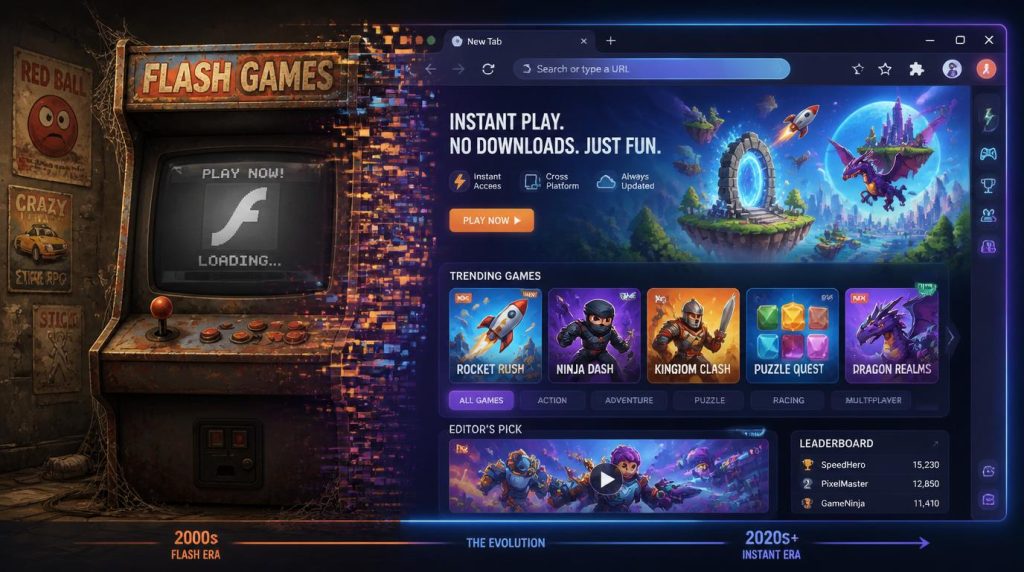
You’ve got fifteen minutes, a laptop, and zero desire to sit through an app-store download that takes up 800MB of your storage for a game you’ll play once. We’ve all been there. The promise of browser gaming has always been “just click and play” — and for a long time, it didn’t quite deliver. Too many clunky Flash-era relics, too many pay-to-win traps. Then Poki came along and actually made good on that promise: a massive library of real games, running smooth in your browser tab, no account needed, no nonsense. This list covers the 10 biggest mobile hits available on Poki right now — what makes each one tick, how they feel on a PC versus a touchscreen, and who should have each one bookmarked.
Subway Surfers
Endless RunnerThere’s a reason Subway Surfers has held the record for the most-downloaded mobile game of all time. The formula is surgically simple: run, swipe, collect, repeat. SYBO Games nailed the feedback loop so completely in 2012 that they barely needed to change it — the world tours (new city, new character, new aesthetic) kept the community hooked for over a decade.
What gives it legs is the risk-reward tension baked into every session. Do you dart left for the gold coin streak, or play it safe down the middle? That split-second decision-making is pure gaming dopamine, and it works identically in a browser.
- Swipe-based mechanics translate cleanly to arrow keys or WASD
- Rotating world events give returning players a reason to check back weekly
- Character unlock system doubles as a light collector’s progression
Temple Run 2
Endless RunnerIf Subway Surfers owns the streets, Temple Run 2 owns the jungle. Imangi Studios took the original’s cult following and upgraded everything: richer environments, tighter controls, and that stomach-drop bridge section that still catches new players off guard years later.
What made Temple Run a cultural moment was the perspective. A third-person chase game on mobile felt cinematic in 2011 — suddenly you weren’t just tapping a screen, you were being hunted. The sequel refined that tension while adding ziplines, mine carts, and terrain variety that kept the original’s fanbase deeply engaged.
- Tilting mechanics (originally gyroscope-based) mapped to left/right keys on PC
- Objective system gives structured short-term goals beyond pure score-chasing
- Power-up upgrade tree rewards consistent play without forcing purchases
Crossy Road
Arcade HopperHipster Whale took the ancient premise of Frogger, wrapped it in voxel art, and made it feel completely fresh. Crossy Road is deceptively deep. On the surface it’s “don’t get hit by a car.” Underneath, there’s a timing-based rhythm to traffic patterns, river logs, and moving platforms that skilled players read like music.
The unlockable character roster (250+) became a meme factory. Getting the secret characters through coin mechanics — rather than pure IAP — was a masterstroke of game design that kept the community hunting and sharing discoveries constantly.
- Tap-to-hop mechanic is as intuitive as it gets — one input, infinite expression
- Isometric voxel art renders crisply in browser at any resolution
- Genuinely funny character unlocks keep the meta-game alive
Jetpack Joyride
Side-ScrollerHalfbrick Studios had already built a hit with Fruit Ninja, but Jetpack Joyride was the game that cemented their legacy. Barry Steakfries and his coin-magnet jetpack introduced a side-scroller where one button does everything — hold to go up, release to fall — and the elegant simplicity of that single mechanic gave the game enormous accessibility without sacrificing skill expression.
The mid-run vehicles (teleporter, gravity suit, profit bird) are pure chaos injection. Just when a run gets predictable, you collect a power-up that completely changes how you interact with the level for 20 seconds. That variety is why Jetpack Joyride still has a loyal player base after 10+ years.
- Single-button design: spacebar or click holds up perfectly on PC
- Mission system creates daily to-do list of specific run challenges
- Costume and jetpack unlocks give sessions a visual upgrade loop
Retro Bowl
Sports StrategyRetro Bowl is the quiet overachiever on this list. It didn’t come from a major studio, didn’t launch with hype, and didn’t flood social media with trailers — it just quietly became one of the most played sports games in browser history by being genuinely great. New Star Games captured the fantasy of being an NFL head coach and quarterback wrapped in 16-bit pixel art that feels like a love letter to classic handheld sports games.
You call plays, manage your roster, handle player morale and contracts, and then actually execute the passes yourself. The dual-layer of management sim plus arcade action scratches two completely different gaming itches simultaneously.
- Swipe-to-throw mechanic translates to mouse drag on desktop — surprisingly precise
- Front-office management layer gives “just one more game” energy between sessions
- Retro 8-bit pixel art loads instantly at any connection speed
Slope
Skill / ReflexSlope is the game that took up permanent residence in every school computer lab browser tab for a reason: it’s violently addictive despite having exactly two inputs. You’re a ball on an infinite neon slope, tilting left and right to avoid red blocks and stay on the surface. That’s it. That’s the game.
What Slope does with that premise is remarkable. The speed ramps relentlessly. The procedural generation ensures no two runs are identical. The camera angle creates genuine vertigo that makes 10-minute sessions feel physically intense. It’s the kind of game that makes you realize you’ve been holding your breath.
- Pure keyboard design — A/D or arrow keys, no mouse needed
- Speed escalation creates a natural difficulty curve that feels personal
- Procedural generation makes high-score chasing endlessly replayable
8 Ball Pool
Sports / CasualMiniclip’s 8 Ball Pool is one of the most-played online games in history — across any platform — and it’s the only game on this list where a browser on a big monitor gives you a genuinely competitive advantage. Aiming a pool shot with a mouse on a 24-inch screen is materially better than tapping at a 6-inch phone display.
The social matchmaking layer is what turned this from a Flash game into a phenomenon. Playing strangers for in-game coins, joining tournaments, customising your cue — those hooks built a competitive community of millions before mobile gaming was taken seriously as a platform.
- Mouse aim allows finer cue alignment than touch ever could
- Real-time multiplayer matchmaking works smoothly in-browser
- Progression system (coins, cues, locations) creates long-term goals
Helix Jump
Arcade / PuzzleHelix Jump was one of those viral moments that felt like it came from nowhere and was suddenly everywhere. Voodoo’s mobile hit took a single mechanic — rotate a helix platform to guide a falling ball through gaps — and made it genuinely satisfying through sound design alone. That “crack” when you crash, the ascending pitch as you chain gap-to-gap combos — it’s tactile feedback through speakers.
The progression through increasingly complex helix patterns creates a natural difficulty spike that feels earned rather than artificial. The fact that you’re rotating the world rather than moving the ball is a small design inversion that keeps the experience feeling distinctive.
- Mouse drag replaces touch rotate on PC — same circular motion, different input
- Color and sound design create genuine sensory satisfaction in each run
- Combo system rewards patience over spam-clicking
Stack
Arcade / PrecisionKetchapp’s Stack is the purest expression of “one mechanic, infinite depth” in casual gaming. Tap to stop a moving block. Stack it perfectly. Repeat. Miss and your platform shrinks. The game becomes a slow-motion version of your own panic — as the tower gets taller and the blocks get faster, there’s a meditative quality to finding the rhythm.
Stack is one of those games that got genuinely competitive on social media because the skill ceiling is high despite the simple premise. Achieving a perfect-stack run of 30+ blocks with zero trimming is harder than it sounds, and players shared those clips obsessively.
- Spacebar click on PC is perfectly calibrated — zero input lag in browser
- Color gradient shift as you climb rewards long runs visually
- Precision-based rather than reflex-based — accessibility through focus, not speed
Paper.io 2
Multiplayer / StrategyVoodoo’s Paper.io 2 is the multiplayer entry on this list, and it earns its spot through one of the best “just one more game” hooks in casual gaming. You control a square that trails a line behind it — close the loop to claim territory, but if anyone hits your trail before you close it, you die. It’s Tron meets territory conquest, and it’s ruthlessly competitive.
The game is played with real humans online, which makes every session unpredictable. A giant player can be taken down by a tiny new player who sneaks across their trail. The underdog mechanic keeps matches from feeling predetermined, and the browser version runs multiplayer with virtually no latency issues.
- Arrow key control scheme is purpose-built for keyboard — no adaptation needed
- Real-time multiplayer against actual players (not bots) elevates every round
- Risk/reward territory-claiming creates split-second strategic depth
Browser gaming finally grew up
The era of sluggish, ad-laden browser games is over. What Poki has done — curating a library of genuinely great titles that load instantly, run smoothly, and require nothing from you except a browser tab — is quietly significant. It’s the closest thing we have to a Netflix for casual gaming.
The 10 games above aren’t just “fine for browser games.” They’re legitimately great games that happen to run in a browser. Subway Surfers, Retro Bowl, and Paper.io 2 each have active communities numbering in the millions. Slope has its own competitive culture. 8 Ball Pool rewards real skill. These aren’t compromises — they’re the real thing, playable anywhere.
If you haven’t touched browser gaming since the Flash era, Poki is the reminder that the format went through its own quiet revolution. Bookmark this page, open a new tab, and start with Jetpack Joyride. You’ll understand what all the fuss is about within 90 seconds.