Why bother with Japanese game codes?
Short answer: because Japan’s digital storefront is its own universe, and some of what’s in it never leaves the country. Here’s the longer version.
Region-exclusive DLC
Certain costumes, storyline expansions, and collaboration DLC packs are Japan-only and never make it to Western storefronts. Full stop.
Early releases
Japan’s time zone advantage is real. Games go live on the eShop at midnight JST — that’s hours before they unlock in Europe or North America.
Yen exchange rate in 2026
The yen has been weak. Buying a ¥7,000 title when ¥1 ≈ USD 0.0066 means paying roughly $46 USD instead of the $70 USD Western price tag. That gap still matters.
Games that don’t exist elsewhere
Visual novels, niche JRPGs, pachinko titles, and retro compilations. If you love the evolution of point-and-click adventure gaming, the Japanese library has deep roots you’ll want to tap.
Bottom line: the Japanese digital market isn’t just an alternative — it’s often the only place to get what you want.
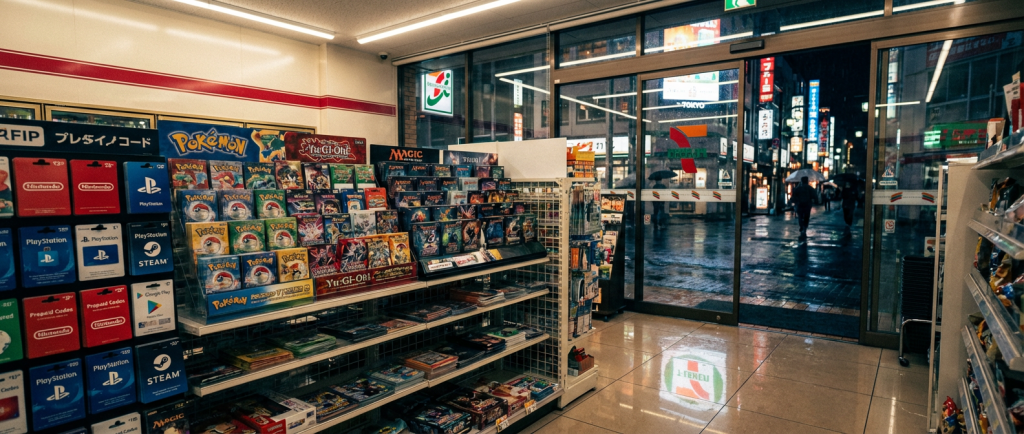
The Konbini Method — Buying physical codes inside Japan
If you’re physically in Japan, the convenience store (konbini) is your best friend. No Japanese bank account needed. No ID required. Just cash and the ability to poke at a touchscreen in Japanese — which isn’t as hard as it sounds.
Three konbini chains dominate the game code market. Each uses a different kiosk system, so here’s the breakdown.
| Store | Kiosk Name | Payment | English UI? |
|---|---|---|---|
| 7-Eleven | Multi-Copy Machine (multiCOPY) | Cash at register | Partial |
| Lawson | Loppi | Cash at register | No |
| FamilyMart | Famiport | Cash at register | No |
① 7-Eleven — The Multi-Copy Machine
7-Eleven’s multiCOPY kiosk handles game codes, concert tickets, and government forms — it’s the Swiss Army knife of Japanese retail tech. Here’s the flow:
It’s usually near the back or next to the print/copy section. Looks like a large grey touchscreen terminal.
Scroll to the relevant platform: Nintendo eShop, PlayStation Network, Steam Wallet, or point card top-ups.
Common amounts: ¥1,000 / ¥3,000 / ¥5,000. For Nintendo Switch games, ¥5,000+¥3,000 typically covers a full title.
The kiosk spits out a paper slip with a barcode. Take this to the cashier.
The cashier scans the slip, you hand over cash, and they print or hand you a card with the digital code on it. Done.
② Lawson — Loppi Machine
Loppi is Lawson’s proprietary kiosk. No English interface, but the icon-based navigation is straightforward. Follow these steps:
- On the Loppi home screen, tap 「各種番号をお持ちの方」 (the top-left button — “For those with a code/number”).
- You’ll be prompted to enter an inquiry number. If buying PSN cards, look for the PlayStation logo on the scrollable menu instead.
- Select your card type and denomination, then confirm.
- Loppi prints a slip. Take it to the register within 30 minutes — it expires.
- Pay cash. Done. The code is on the card or printed slip you receive.
③ FamilyMart — Famiport
Famiport works almost identically to Loppi. The kiosk has a similar layout, and FamilyMart staff are generally used to confused foreigners hovering near it.
- Select 「エンタメ」 (Entertainment) from the main menu.
- Navigate to games — look for platform logos (Nintendo, PlayStation, Steam).
- Choose denomination, confirm, and print the slip.
- Same deal: pay at the counter within 30 minutes.
The Remote Method — Buying Japanese codes from abroad
You don’t need to be in Japan to buy digital game codes Japan storefronts carry. Two reliable routes exist: Amazon Japan and established third-party resellers.
A Amazon Japan — The Cleanest Option
Amazon Japan (amazon.co.jp) sells Nintendo eShop cards, PSN cards, and BitCash directly as digital products that get emailed to you. The challenge is that Amazon blocks “Out of Region” purchases for digital goods if your billing address is outside Japan.
Here’s how to get around that cleanly:
Go to amazon.co.jp and sign up with your regular email. Your existing Amazon.com account won’t work for this — you need a separate .co.jp account.
This is the key step. Use any publicly available Japanese address — a hotel, your company’s Japan office, or a well-known building address. Amazon uses this to confirm “Japan region” intent, not to physically ship anything. Common choice: the address of the Shinjuku or Shibuya Apple Store works fine as a placeholder.
Visa and Mastercard issued outside Japan generally work for digital purchases. If your card blocks foreign transactions, Wise’s virtual card (set to JPY) is a reliable fallback.
Search in Japanese: ニンテンドープリペイド (Nintendo prepaid) or プレイステーションカード (PlayStation card). Filter by “Digital” delivery. Select denomination and buy.
Amazon JP sends the code to your inbox — usually within minutes, occasionally up to an hour. Check spam if it doesn’t show.
B Third-Party Resellers — When Amazon Won’t Play Ball
If your card keeps getting declined on Amazon JP, or you just want a simpler process, two resellers have earned trust in the community over many years:
Play-Asia
The veteran. Play-Asia has sold import game codes since the early 2000s. Their Japan eShop card selection is solid, delivery is instant-to-one-hour, and they accept PayPal. Prices carry a small premium over Amazon JP, but the reliability is worth it.
Rakuten (Global)
Rakuten’s global marketplace hosts Japanese sellers who ship digital codes internationally. More variable than Play-Asia — seller reputation matters here — but you can find competitive prices and rare denominations that Amazon JP doesn’t list.
Both are legitimate. Both have been around long enough that the community has stress-tested them. For buying WebMoney Japan codes specifically, Play-Asia is usually the easier call — they carry WebMoney in ¥500 to ¥5,000 denominations with no region hassle.
Currencies & Platforms — What goes where
Not all codes are interchangeable. Here’s the map:
🎮 Nintendo eShop Japan
Nintendo eShop Japan runs on Japanese yen only. You need a separate Japanese Nintendo account (free to create — just use a Japanese address during signup). Once your account is set to Japan region, top it up with prepaid cards and buy directly from the JP eShop.
- Cards available: ¥1,000 / ¥2,000 / ¥3,000 / ¥5,000
- DLC works across regions only if the base game is also from JP — don’t mix regions.
- Switching between JP and another region account on the same Switch is fine. Game purchases stay tied to the purchasing account but can be played on your primary console by any user.
🎮 PlayStation Network Japan
PSN Japan is a completely separate wallet from your home region account. You’ll need a Japanese PSN account (again, just use a JP address during creation). Top up with Japanese PSN cards and buy from the JP PlayStation Store.
- PS4/PS5 games are region-free in terms of gameplay, but DLC must match the game’s region.
- If you’re already playing PSN JP across multiple platforms, this is worth the setup — especially for multiplayer titles popular in Australia and Asia that have stronger server populations on Japanese PSN.
💳 BitCash
BitCash is a prepaid digital currency used across Japanese web services — not just games. You’ll encounter it on:
- Japanese online games and browser MMOs
- Digital manga and anime platforms
- Some adult content platforms (it’s the dominant currency there)
BitCash codes come in ¥500, ¥1,000, ¥3,000 denominations. You redeem them directly on participating sites — no account needed on BitCash’s end. Available at all major konbini and via Play-Asia online.
💳 WebMoney Japan
Buying WebMoney Japan is essential if you’re into PC gaming via DMM Games, DLsite, or older Japanese online titles. WebMoney is a prepaid card currency similar to BitCash but used by a different set of platforms.
- DMM Games accepts WebMoney for top-ups on titles like Granblue Fantasy (PC browser version) and various strategy/gacha titles.
- DLsite uses WebMoney for indie Japanese games, doujin music, and digital books.
- Codes are 16-digit numeric strings redeemed on the WebMoney site, then linked to platform accounts.
Pro Tips — The stuff they don’t put in FAQ pages
Collected from years of importing Japanese games and watching other people make expensive, avoidable mistakes.
Regional DLC is a trap if you’re not careful
This bears repeating: if you buy a Japanese version of a game on eShop or PSN, every piece of DLC for that game must also come from the JP store. Buying the Western Season Pass and trying to apply it to a JP base game will fail silently — you won’t get an error, the DLC just won’t appear. Always buy base game and DLC from the same regional storefront.
2FA and Japanese phone numbers
Some Japanese platform accounts require a Japanese phone number for two-factor authentication — Nintendo and older-style Japanese gaming portals are the main culprits. If you don’t have a Japanese SIM, use a Japanese VoIP service (SMS reception only) like SMSpool for the verification step. For new accounts created in 2025+, most platforms have shifted to email 2FA, so check first before panicking about phone numbers.
Use Wise or Revolut for better exchange rates
When paying on Amazon JP or Play-Asia in yen, your home bank’s exchange rate will quietly steal 2–4% from every transaction. Wise and Revolut both offer near-mid-market rates with low flat fees. Set up a Wise account, add a JPY balance when the yen is favorable, and use the virtual Wise card for all your Japanese digital purchases. Over multiple purchases per year, this saves real money.
Keep a separate email for JP gaming accounts
Japanese platforms love sending promotional emails — in Japanese, obviously. Create a dedicated Gmail alias for all JP gaming accounts so your main inbox doesn’t become a bilingual chaos. It also makes account recovery infinitely easier when you can filter all JP gaming emails to one place.
Check if the game has a Japanese language lock
Most modern titles let you change language settings independent of region. But some older titles and certain exclusives are Japanese-only with no option to switch. Before buying a ¥7,000 JRPG from the JP eShop, confirm language options in the game’s eShop listing or on a site like JapaneseNintendo.com. Nobody wants to discover mid-dungeon that there’s no English option.
Frequently asked questions
The questions that actually get searched, answered properly.